Why did you need/want a Google Sites consultant? What’s it been like working with Kirksville Web Design?
We wanted a Google Sites consultant/partner to increase our knowledge expertise and efficiency. Kyle is 100% focused on Google Sites. Since partnering with Kyle the Great we have been able to bounce ideas off of each other and come up with creative solutions and designs for Sites.
Simply put, partnering with Kirksville Web Design and working with Kyle has been awesome and beneficial for our clients.
We’ve had a couple of great projects together, what were those like from your perspective?
Yes we have! What always amazes me about you is the efficiency at which you work. We have actually had clients say they were happy and surprised with the amount of time it took. Your visual creativity for sites adds alot of value, it’s always important for sites to have good content, but the display is also important and contributes to the engagement of users.
Our working relationship is excellent, we often call you with a complex and large project, give you some info and you say you’re ready to go. Within a few days we see a protoype, love it, and move forward to get a finished product. From my perspective, your work with Google Sites is largely beneficial.
How do you intend to advertise Google Sites in the future? How will you market Google Sites in your proposals for deployment?
We advertise Google Sites as a hidden value in the Google Apps for Business suite of tools. People often think Gmail is all they’re getting when they pay $50/user/year, then they start diving into the product and realize all the benefits. I try to help companies realize the continuous value proposition of their new engagement in Google Apps.
We market the ability to create and host intranets, websites, workflows, document repositories, etc.
What demographics do you target for Google Sites services?
We are heavily focused on mid-market companies and utilizing sites for intranets, websites and workflows. We also have clients in the educational space who are utilizing Google Sites in classrooms and raising a generation on Google Apps!
What have been the benefits to your company and your clients?
If I haven’t made it clear yet, this is a win-win-win partnership. Our clients benefit from leveraging the Google Apps platform, Cloudbakers benefits by bringing them phenomenal cloud solutions, and Kirksville Web Design benefits by displaying their expertise in every project.
Thanks a ton for the interview Andrew!
Selasa, 30 Juni 2015

New Google Sites - Analytics, Responsive Menu, Headings and more
Intro
I'm still testing out these Google Sites updates. However, in the interest of keeping you all informed on the current build of Google Sites, I am posting the updates for you now.
Improved accessibility, editing and ease of use in Google Sites
Several accessibility improvements have been made to Google Sites, ranging from new keyboard shortcuts for editors (like Alt+Shift+F for opening the editor toolbar) to better viewing experiences for readers. Editors can now also set image width to 100% of the screen width and easily customize the font, color, and size of lower-level headers (H2, H3, and H4 tags).*
Source: http://googleappsupdates.blogspot.com/2014/06/improved-accessibility-editing-and-ease.html
Enhanced integration between Google Sites and other products
Today we launched several features aimed at improving integration between Google Sites and other products. When sharing on social media sites, Google Sites now will showcase images in posts. You’ll see this change when you share Sites links on Google+ and other sites. Google Analytics support on Sites has been improved to support Universal analytics. Finally, Sites can now embed Google Maps Engine Lite, so custom maps you have created can be shared side-by-side with your content.
Source: http://googleappsupdates.blogspot.com/2014/06/enhanced-integration-between-google.html
I'm still testing out these Google Sites updates. However, in the interest of keeping you all informed on the current build of Google Sites, I am posting the updates for you now.
Improved accessibility, editing and ease of use in Google Sites
Several accessibility improvements have been made to Google Sites, ranging from new keyboard shortcuts for editors (like Alt+Shift+F for opening the editor toolbar) to better viewing experiences for readers. Editors can now also set image width to 100% of the screen width and easily customize the font, color, and size of lower-level headers (H2, H3, and H4 tags).*
Source: http://googleappsupdates.blogspot.com/2014/06/improved-accessibility-editing-and-ease.html
Enhanced integration between Google Sites and other products
Today we launched several features aimed at improving integration between Google Sites and other products. When sharing on social media sites, Google Sites now will showcase images in posts. You’ll see this change when you share Sites links on Google+ and other sites. Google Analytics support on Sites has been improved to support Universal analytics. Finally, Sites can now embed Google Maps Engine Lite, so custom maps you have created can be shared side-by-side with your content.
Source: http://googleappsupdates.blogspot.com/2014/06/enhanced-integration-between-google.html
Jumat, 26 Juni 2015
An Deeper Look at Recent Google Sites Updates
Google has been rolling out some nice updates to Google Sites and while everyone is "a-twitter" about mobile render of Google Sites there's also some lesser recognized updates.
1. Google Promotes Adsense Usage with Google Sites
I found out this little button appeared on my drop-down bar for More Actions and basically I've been accidentally clicking it instead of Manage Site (Picture 1). Anyways, let's explore this. Click the button and you taken to a redesigned Adsense page just for Google Sites.
Google is encouraging Google Sites designers to use Adsense. Obviously intranet / project management Sites are not intended to be breeding grounds for Ads, therefore Google is implying that public Google Sites should be using their Ads. If Google wants to make money, it stands to reason that they want to make Google Sites better for web designers.
My conclusion? Google Sites will continue to improve as a platform for public websites. Our first evidence of this is mobile rendering of Google Sites. Just a little button can mean so much.
2. Customize System Footer Links
It has been nice that Google Sites has been unobtrusive for the most part, limiting their required links to the very bottom of the page in small font. However, those links can give visitors the wrong idea thinking they can sign in to your website. Public websites are again being highlighted here with this update. If anything those links are nice for private users. Now you limit the footer links to "Terms" "Report Abuse" and "Powered by Google Sites" - not bad.
3. Mobile Rendering of Google Sites
I have not been able to really experience this. It is still a beast to even attempt to edit a Google Sites on my Ipad 2. I don't have a Droid or iPhone, so if a visitor can enlighten us on the impact of this update, please comment.
1. Google Promotes Adsense Usage with Google Sites
I found out this little button appeared on my drop-down bar for More Actions and basically I've been accidentally clicking it instead of Manage Site (Picture 1). Anyways, let's explore this. Click the button and you taken to a redesigned Adsense page just for Google Sites.
Google is encouraging Google Sites designers to use Adsense. Obviously intranet / project management Sites are not intended to be breeding grounds for Ads, therefore Google is implying that public Google Sites should be using their Ads. If Google wants to make money, it stands to reason that they want to make Google Sites better for web designers.
My conclusion? Google Sites will continue to improve as a platform for public websites. Our first evidence of this is mobile rendering of Google Sites. Just a little button can mean so much.
 |
| Picture 1 - "Sign Up for Adsense" indeed |
 |
| Google's Ads are taking over the Internet, including your Google Sites - but that's a good thing |
2. Customize System Footer Links
It has been nice that Google Sites has been unobtrusive for the most part, limiting their required links to the very bottom of the page in small font. However, those links can give visitors the wrong idea thinking they can sign in to your website. Public websites are again being highlighted here with this update. If anything those links are nice for private users. Now you limit the footer links to "Terms" "Report Abuse" and "Powered by Google Sites" - not bad.
 |
| Web Designers can hide it all...almost |
 |
| That was nice of Google. |
I have not been able to really experience this. It is still a beast to even attempt to edit a Google Sites on my Ipad 2. I don't have a Droid or iPhone, so if a visitor can enlighten us on the impact of this update, please comment.
Kamis, 25 Juni 2015
5 Steps to Launch a Business using Google
Intro
Hello all! +Kyle Horst here with +Kirksville Web Design and now, my brand new local presence company, Columbia Web Design
Google is an integral part of launching a new business these days. We setup a Google Apps account, launched a Google Sites website and created a Google Plus page with Maps listing. We also setup Google Analytics and Google Webmaster tools to track our web presence.
So, ya, we took advantage of all the free Google resources available to new businesses. Let's take a look at the steps.

Step 1
Buy a domain. We purchased www.columbiawebdesign.net because the .com was expensive and Google doesn't have domain extension (TLD) partiality. So don't feel bad if you can't get a .com
Setup Google Apps for Business.
Step 2
Decide on a business name and get that logo designed! We picked a symbol that identifies Columbia, MO. It is a Ionian style column that is on the University campus here. So it is definitely iconic and locally recognized.
Step 3
Make a website using Google Sites. We obviously made our website and designed it from scratch. If you need help with this step, let me know =)
Step 4
Social media is so important for getting quality links quickly dispersed into the web-sphere. You'll need to provide your logo in several sizes to fit and maybe some banner images. We used the brick road quite a lot for a backdrop.
Step 5
Track your visitors using Google Analytics, make sure your website is optimized with best SEO practices and double-check it on Google Webmaster Tools.
Conclusion
That's it! We launched out business and so can you. These 5 easy steps will definitely help you out and feel free to comment on other good ways to build a quick online presence.
Google is an integral part of launching a new business these days. We setup a Google Apps account, launched a Google Sites website and created a Google Plus page with Maps listing. We also setup Google Analytics and Google Webmaster tools to track our web presence.
So, ya, we took advantage of all the free Google resources available to new businesses. Let's take a look at the steps.
Step 1
Buy a domain. We purchased www.columbiawebdesign.net because the .com was expensive and Google doesn't have domain extension (TLD) partiality. So don't feel bad if you can't get a .com
Setup Google Apps for Business.
 |
| GoDaddy is our preferred domain registrar. |
 |
| We love Google Apps for Email Service + |
Step 2
Decide on a business name and get that logo designed! We picked a symbol that identifies Columbia, MO. It is a Ionian style column that is on the University campus here. So it is definitely iconic and locally recognized.
 |
| Flat design, my favorite. |
Make a website using Google Sites. We obviously made our website and designed it from scratch. If you need help with this step, let me know =)
|
| Click here to visit the new Google Sites website for Columbia Web Design. |
Step 4
Social media is so important for getting quality links quickly dispersed into the web-sphere. You'll need to provide your logo in several sizes to fit and maybe some banner images. We used the brick road quite a lot for a backdrop.
 |
| Our Facebook Page to match |
Step 5
Track your visitors using Google Analytics, make sure your website is optimized with best SEO practices and double-check it on Google Webmaster Tools.
 |
| Track your influence and web traffic with Analytics |
Conclusion
That's it! We launched out business and so can you. These 5 easy steps will definitely help you out and feel free to comment on other good ways to build a quick online presence.
Rabu, 24 Juni 2015
Google Sites Viewer Comments System
Introduction
Google Sites commenting has been a nice feature since it started using a Google Plus type format. The commenting feature, however, was restricted to Google Site owners and editors. It was a feature for viewers to use and for more general comments to be given. This, in effect, made it an awkward feature since the purpose was muddled.
Anyways, people developed work arounds using Disqus and other Google Apps Script solutions. Now, let me introduce new and improved viewer commenting capability.
Please note, viewer commenting does not mean public commenting. It is still the case the you cannot enable commenting for the random visitor to leave a comment on your page (leave that to your blog).
Please note, this feature is only available for Google Apps customers.

Enabling Viewer Commenting
As a Google Apps administrator, you can allow authenticated viewers in your domain to comment on your Google Apps Sites to make your sites more social. Viewer commenting is disabled by default, and when you enable this feature, each individual site owner can decide whether they want to turn on viewer commenting for their sites.
Viewer commenting is enabled or disabled at two levels:The domain administrator allows site owners to enable or disable viewer commenting for their sites.
The individual site owners turn viewer commenting on or off for their site.
Google Sites commenting has been a nice feature since it started using a Google Plus type format. The commenting feature, however, was restricted to Google Site owners and editors. It was a feature for viewers to use and for more general comments to be given. This, in effect, made it an awkward feature since the purpose was muddled.
Anyways, people developed work arounds using Disqus and other Google Apps Script solutions. Now, let me introduce new and improved viewer commenting capability.
Please note, viewer commenting does not mean public commenting. It is still the case the you cannot enable commenting for the random visitor to leave a comment on your page (leave that to your blog).
Please note, this feature is only available for Google Apps customers.
Enabling Viewer Commenting
As a Google Apps administrator, you can allow authenticated viewers in your domain to comment on your Google Apps Sites to make your sites more social. Viewer commenting is disabled by default, and when you enable this feature, each individual site owner can decide whether they want to turn on viewer commenting for their sites.
Viewer commenting is enabled or disabled at two levels:The domain administrator allows site owners to enable or disable viewer commenting for their sites.
The individual site owners turn viewer commenting on or off for their site.
Step 1: Configuration for domain administrators
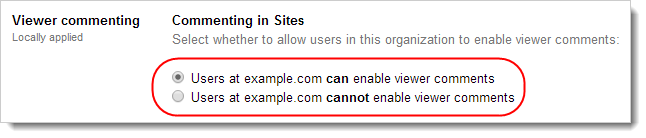
Click Save changes.
- The domain administrator can enable or disable viewer commenting for the entire organization, or for an individual organizational unit by following these steps:
- Sign in to the Google Admin console.
- Click Google Apps > Sites > Sharing settings.
- In the Organizations section, select the organizational unit for which you want to enable or disable viewer commenting.
- In the Viewer commenting section, select whether to enable or disable viewer commenting.
Click Save changes.
Step 2: Configuration for site owners
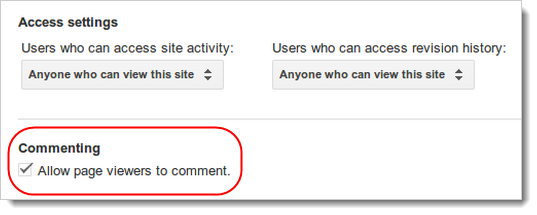
When the box is checked, authenticated users who have viewer access to the site can add their comments.
- Once viewer commenting has been enabled at the administrator level, a site owner can enable or disable viewer comments through their site settings:
- Click the gear icon at the top of the page and select Manage site.
- In the General tab check or uncheck Allow page viewers to comment.
When the box is checked, authenticated users who have viewer access to the site can add their comments.
Conclusion
Why is this important? This greatly helps intranets to be more social. People can leave their comments on Announcements and there can be more of an engaging atmosphere that allows for feedback and commendation. It is an overall morale boost to Google Sites.
Sabtu, 20 Juni 2015
Finally, Google Sites Navigation Spacing Update
Intro
+Kyle Horst here with +Kirksville Web Design for another update to Google Sites, following along the most recent major update to Colors, Fonts, and Themes. So this was the problem, in the horizontal navigation bar you have links, but they are created really close together. It makes the navigation become too crowded too quickly.
Now, we can modify the margins or padding around horizontal navigation links through the Themes, Colors, and Fonts panel. It used to be the case that you could add spacers in the horizontal navigation bar, by using Add URL, hitting the space bar for the Title of the Link and pasting a bogus URL. You were given about 10 pixels of space then, with no adverse effect.
About the New Feature
I believe this is still only available through Rapid Release if you are running Google Apps for Business.
Go to More > Manage Site > Themes, Colors, and Fonts > Horizontal Navigation > Layout. Here's what you'll see:
We are given three options in Alignment: Left, Center, Right.
We are given 1 option for numerals of seemingly infinite number of digits for Margin.
Note: The margin will affect the left and right margins on all links, so the first link may not be flush with your content area width.
Conclusion
Google Sites is getting regular love! Well, if twice in a couple weeks is regular. Notice that these are aesthetic or design changes. Therefore, design and how their product looks is important. Google Sites is becoming an even better option for public websites. Not only that, but it puts ugly internal CMS to shame, because they can be well-branded, beautifully designed company sites.
Way to go Google Sites team! Maybe they read this blog, I have no idea. =)
+Kyle Horst here with +Kirksville Web Design for another update to Google Sites, following along the most recent major update to Colors, Fonts, and Themes. So this was the problem, in the horizontal navigation bar you have links, but they are created really close together. It makes the navigation become too crowded too quickly.
Now, we can modify the margins or padding around horizontal navigation links through the Themes, Colors, and Fonts panel. It used to be the case that you could add spacers in the horizontal navigation bar, by using Add URL, hitting the space bar for the Title of the Link and pasting a bogus URL. You were given about 10 pixels of space then, with no adverse effect.
About the New Feature
I believe this is still only available through Rapid Release if you are running Google Apps for Business.
Go to More > Manage Site > Themes, Colors, and Fonts > Horizontal Navigation > Layout. Here's what you'll see:
 |
| Click to Enlarge |
We are given 1 option for numerals of seemingly infinite number of digits for Margin.
Note: The margin will affect the left and right margins on all links, so the first link may not be flush with your content area width.
Conclusion
Google Sites is getting regular love! Well, if twice in a couple weeks is regular. Notice that these are aesthetic or design changes. Therefore, design and how their product looks is important. Google Sites is becoming an even better option for public websites. Not only that, but it puts ugly internal CMS to shame, because they can be well-branded, beautifully designed company sites.
Way to go Google Sites team! Maybe they read this blog, I have no idea. =)
Selasa, 16 Juni 2015
Google Gooru Admin Training Week

I wanted to make sure I personally invited you to this round of Admin Training Week. I also wanted to let you know that this Admin Training Week will be very different than the last one:
- 9 presentations (3 more than last time)
- All new topics (no overlap from last time)
- Roundtable discussion with real Google Apps Admins
So, if you have time in your calendar on the 17th, 18th and 19th, it would be great to have you again for the next Admin Training Week.
Register Here
Hope to see you there!
Minggu, 14 Juni 2015
Google Sites and Cloudbakers (Part 1)
Introduction
Building solid partnerships with Google Apps Resellers is an important aspect of being a freelancer, consultant, and/or the graphic designer. Just think, Google Apps Resellers are charged with providing cloud computing solutions and that alone has them involved in all sorts of supplementary services.
My company, Kirksville Web Design, has had the pleasure of partnering with Google Apps Reseller, Cloudbakers, for Google Sites design and development services. For the most part, we provide the graphics and Sites know-how, while Cloudbakers consults with clients and provides Google Apps Script support. My point of contact over the past months has been Andrew Johnston. We chat all the time and so when I asked him for an interview, he was delighted.
Andrew, tell us a bit about Cloudbakers and yourself.
I am the Manager of Business Development for Cloudbakers, a Chicago-based Google Apps Premier SMB Reseller. Working with Cloudbakers is always exciting, we are a close-knit team, tirelessly dedicated to giving our customers the best cloud solutions available. Cloudbakers was Founded on the mission to be a cloud solution partner for mid-market companies. We partner with leading SaaS companies, like Google, to offer best-of-breed cloud products to our clients. Cloudbakers adds value by bringing deployment, implementation and integration expertise to the table and having technology enable companies so they can focus on their core business.
Partnering with Kyle and Kirksville Web Design has added tremendous value to our business as Kyle contributes a high level of Google Sites expertise that our clients leverage.
Building solid partnerships with Google Apps Resellers is an important aspect of being a freelancer, consultant, and/or the graphic designer. Just think, Google Apps Resellers are charged with providing cloud computing solutions and that alone has them involved in all sorts of supplementary services.
My company, Kirksville Web Design, has had the pleasure of partnering with Google Apps Reseller, Cloudbakers, for Google Sites design and development services. For the most part, we provide the graphics and Sites know-how, while Cloudbakers consults with clients and provides Google Apps Script support. My point of contact over the past months has been Andrew Johnston. We chat all the time and so when I asked him for an interview, he was delighted.
 |
| A Great Google Apps Reseller in Chicago, IL, US |
Andrew, tell us a bit about Cloudbakers and yourself.
I am the Manager of Business Development for Cloudbakers, a Chicago-based Google Apps Premier SMB Reseller. Working with Cloudbakers is always exciting, we are a close-knit team, tirelessly dedicated to giving our customers the best cloud solutions available. Cloudbakers was Founded on the mission to be a cloud solution partner for mid-market companies. We partner with leading SaaS companies, like Google, to offer best-of-breed cloud products to our clients. Cloudbakers adds value by bringing deployment, implementation and integration expertise to the table and having technology enable companies so they can focus on their core business.
Partnering with Kyle and Kirksville Web Design has added tremendous value to our business as Kyle contributes a high level of Google Sites expertise that our clients leverage.
 |
| Andrew Johnston - Find him on Google Plus |
How has Cloudbakers used Google Sites?
We leverage Google Sites in all aspects of our business. Google Apps is a high value product, most of our clients begin by using Gmail, Calendar & Contacts, once they go beyond those select products and utilize Docs, Groups, and Sites the value proposition goes through the roof! One of the ways we use Google Sites for ourselves is through our website, www.cloudbakers.com. Hosting our website on Google Sites, included in our Google Apps for Business suite, has saved us time and money.
Our clients are creatively using Google Sites for many different aspects of their business including:
We leverage Google Sites in all aspects of our business. Google Apps is a high value product, most of our clients begin by using Gmail, Calendar & Contacts, once they go beyond those select products and utilize Docs, Groups, and Sites the value proposition goes through the roof! One of the ways we use Google Sites for ourselves is through our website, www.cloudbakers.com. Hosting our website on Google Sites, included in our Google Apps for Business suite, has saved us time and money.
Our clients are creatively using Google Sites for many different aspects of their business including:
- Integration with other IT systems
- Robust Intranet Sites
- Feature rich websites integrated with other Apps
- Training Sites
- Embedded events calendars
- Workflows
A significant part of our service offering for Google Apps deployments is our Enterprise Change Management campaign. We use Google Sites to create a branded self-service help site with videos, tutorials, FAQ, etc. Integrating our clients legacy IT systems with Google Apps & Sites is in high demand right now.
What do you think of Google Sites and how has that opinion changed in the past few years?
I think Google Sites is absolutely awesome! It is a place where companies can really innovate and keep their users engaged with the mission, goals and strategy of the company. The ability to efficiently create intranet sites and allow teams to collaborate and share information in them is huge. It is also a place where companies can market themselves on the internet.
The biggest thing that stands out to me with Google Apps is the rapid innovation and pace at which Google improves products such as Google Sites. Over the last few years, there have been lots of improvement and increased abilities to build workflows, customizations, etc. What I am really looking forward to is the next few years of innovation and improvement.
My opinions really changed after starting to work with Kyle who dominates Google Sites. He completely transformed my ideas and vision of Google Sites, everyday there is something new I learn or see on Google Sites.
What do you think of Google Sites and how has that opinion changed in the past few years?
I think Google Sites is absolutely awesome! It is a place where companies can really innovate and keep their users engaged with the mission, goals and strategy of the company. The ability to efficiently create intranet sites and allow teams to collaborate and share information in them is huge. It is also a place where companies can market themselves on the internet.
The biggest thing that stands out to me with Google Apps is the rapid innovation and pace at which Google improves products such as Google Sites. Over the last few years, there have been lots of improvement and increased abilities to build workflows, customizations, etc. What I am really looking forward to is the next few years of innovation and improvement.
My opinions really changed after starting to work with Kyle who dominates Google Sites. He completely transformed my ideas and vision of Google Sites, everyday there is something new I learn or see on Google Sites.
There's more to my interview with Andrew. Up next - Google Sites examples and how we've leveraged Sites to Google Apps customers.
Jumat, 12 Juni 2015
Inspiration - PoweredByGoogleSites.com
Kirksville Web Design is announcing to launch of a new website: www.poweredbygooglesites.com.
The mission of this website is to propagate and promote designer websites creating using Google Sites. I have journeyed to all sorts of Google Sites websites and found stellar examples and sadly, many duds. However, if we can let the light shine on the wonderful websites developed by some talented graphic arts, designers, and hobbyists, Google Sites will go places.
So join me as I publish entries and look forward to submissions. This is an excellent opportunity to showcases incredible work pushing to potential of Google Sites.

Criteria for selection will be based on style, information architecture, and creativity.
Tell your friends!
The mission of this website is to propagate and promote designer websites creating using Google Sites. I have journeyed to all sorts of Google Sites websites and found stellar examples and sadly, many duds. However, if we can let the light shine on the wonderful websites developed by some talented graphic arts, designers, and hobbyists, Google Sites will go places.
So join me as I publish entries and look forward to submissions. This is an excellent opportunity to showcases incredible work pushing to potential of Google Sites.

Criteria for selection will be based on style, information architecture, and creativity.
Tell your friends!
Senin, 08 Juni 2015
News - Soft Delete a Website
Google has consistently been rolling out updates for Google Docs and Google Sites and they have helped Google Sites users once again. Now I have never deleted a site so I never had to recover one, but I am sure that if I did this Soft Delete would come in handy.
Software engineers have retooled Google Sites features, but has not released anything truly exciting or major. At first I was excited about the web fonts, but some are rendered obsolete due to poor rendering (too small or too bold). This soft delete feature is also welcome, but is it something admins or end-users have actually clamored for? No. You could just not delete site, I mean you are limited to the amount of Sites you have (I haven't hit the limit at about 50 yet).
If you want to voice your ideas about Google Sites and whatever feature you would like to see, new or improved, please visit Google's moderator on Product Ideas. It says it is for Google Docs, but Google Sites ideas are welcome. Suggest members only page permissions, better background management, dynamic scaled column layouts, go crazy. Enough editorial, read on.
Soft delete your sites
We’ve received a lot of feedback that it was sometimes difficult to restore a deleted site, since you needed to remember a deleted site’s URL. Starting today, you will be able to view any sites you’ve deleted in the Deleted sites section of My Sites rather than needing to remember their URLs. In this section, you can also choose to restore your site or delete it permanently before 30 days have passed. Note that as before, after the 30-day grace period, deleted sites will be permanently deleted.

Let us know what you think of these updates. If you have any ideas for new features, submit them to our Product Ideas page, open until June 16.
Software engineers have retooled Google Sites features, but has not released anything truly exciting or major. At first I was excited about the web fonts, but some are rendered obsolete due to poor rendering (too small or too bold). This soft delete feature is also welcome, but is it something admins or end-users have actually clamored for? No. You could just not delete site, I mean you are limited to the amount of Sites you have (I haven't hit the limit at about 50 yet).
If you want to voice your ideas about Google Sites and whatever feature you would like to see, new or improved, please visit Google's moderator on Product Ideas. It says it is for Google Docs, but Google Sites ideas are welcome. Suggest members only page permissions, better background management, dynamic scaled column layouts, go crazy. Enough editorial, read on.
Soft delete your sites
We’ve received a lot of feedback that it was sometimes difficult to restore a deleted site, since you needed to remember a deleted site’s URL. Starting today, you will be able to view any sites you’ve deleted in the Deleted sites section of My Sites rather than needing to remember their URLs. In this section, you can also choose to restore your site or delete it permanently before 30 days have passed. Note that as before, after the 30-day grace period, deleted sites will be permanently deleted.

Let us know what you think of these updates. If you have any ideas for new features, submit them to our Product Ideas page, open until June 16.
Chat To Customers Whilst They Are On Your Website!
Happy Wednesday Everyone,
Beckystar here from Web Princess in England.
Wouldn't it be great customer service if your customers could talk to your whilst they are browsing your google site?
How? I hear you ask . . .
It's simple, just Create A Google Talk Chatback Badge!
It's simple, just Create A Google Talk Chatback Badge!
1) Do you have a gtalk account? For those who do not have one set one up
2) Visit Google Talk Chatback Badge and get the html code for your account
TIP! It helps to already be signed into your google talk account in the background
3) Once you have your code copied to your clip board sign into your google site, navigate to the page where you want to show you are available for chat.
4) Click on edit > insert > more gadgets > in the search bar type code wrapper, select code wrapper which is 4th on the list > paste in your code from the google talk badge page > change the width of the gadget to 200 pixels and the height to 60 pixels > untick the title box and border box
5) Click ok!
6) Chat, chat, chat!!!
4) Click on edit > insert > more gadgets > in the search bar type code wrapper, select code wrapper which is 4th on the list > paste in your code from the google talk badge page > change the width of the gadget to 200 pixels and the height to 60 pixels > untick the title box and border box
5) Click ok!
6) Chat, chat, chat!!!
Let me know how you get on.....
 |
| This it what the chat client will look like once you have engaged in conversation |
Sabtu, 06 Juni 2015
Launching AppsResellers.net
Here at Kirksville Web Design we are proud to announce the launch of our newest website and this one is close to our heart. =)
AppsResellers.net is dedicated to easily showing people how to find a Google Apps Authorized Reseller near you.

Visitors can use the handy Google Map tool to find their location and Google Apps Resellers in their area.

We look forward to telling you more about the site, but for now, explore it and enjoy.
www.appsresellers.net
Kamis, 04 Juni 2015
Site Search Update & Bug
UPDATE 6/5/2012 9:13am - Steps are being taken to fix the bug as I speak. The search box can now be disabled. If you had it previously disabled before the bug it will revert to that. However, there seems to be some vertical alignment issues to iron out. Horizontal navigation bars are being adversely effected. I'll keep you posted.
Intro
This is kind of a bug report and update in one. Overall this is a small update, but one that will be very handy for company intranets and schools. I hope to use it soon on Kirksville Web Design intranet projects.

Bug
Even though you may have Search disabled, it seems to be showing up. You can visit Manage Site > Site Layout > Site Search > the box will be unchecked.
This may interfere with graphics that weren't made to take this into account. A small hassle, but still one that needs resolved.
Update
A new checkbox for search all sites in your Google Apps domain. You are no longer confined to searching within one site for what you need.
To go along with this update, a drop down box specifying the default setting is available.
Conclusion
Google Sites is received a bit more love in terms of intranet-helpful updates. Perhaps more integration with Google Drive is on the horizon. We shall see.
Intro
This is kind of a bug report and update in one. Overall this is a small update, but one that will be very handy for company intranets and schools. I hope to use it soon on Kirksville Web Design intranet projects.

Bug
Even though you may have Search disabled, it seems to be showing up. You can visit Manage Site > Site Layout > Site Search > the box will be unchecked.
This may interfere with graphics that weren't made to take this into account. A small hassle, but still one that needs resolved.
Update
A new checkbox for search all sites in your Google Apps domain. You are no longer confined to searching within one site for what you need.
To go along with this update, a drop down box specifying the default setting is available.
 |
| Google Apps Wide Site Search Capability! |
Conclusion
Google Sites is received a bit more love in terms of intranet-helpful updates. Perhaps more integration with Google Drive is on the horizon. We shall see.
New Google Sites Features - Change Navigation Font Size +
Intro
Hey! +Kyle Horst here with +Kirksville Web Design Good things come to those who wait and those who post their feedback on the Google Sites help forum and Google Sites issues list. The Google Sites team has released some significant changes to the platform today. Rolling it out to regular Google accounts and Rapid Release Google Apps accounts.
What's New?
Here's what you get:
Hey! +Kyle Horst here with +Kirksville Web Design Good things come to those who wait and those who post their feedback on the Google Sites help forum and Google Sites issues list. The Google Sites team has released some significant changes to the platform today. Rolling it out to regular Google accounts and Rapid Release Google Apps accounts.
What's New?
Here's what you get:
- Ability to change font size of Horizontal Navigation Bar
- Ability to change the font size of the Sidebar text
- Ability to change the font size in Content Area Gadgets text
- A new theme called "Ski"
- All-inclusive design menu called, Themes, Colors, Fonts
Our Brand New Website:
Here's some screenshots:
 |
| Visit the Commemorative Google Site for these new Sites features. |
 |
| New Menu with everything you need in a simple fashion. See, change the font size! |
 |
| Awesome redesigned menu. |
 |
| New Theme called Ski |
Conclusion
What's the best part about this new version of Google Sites? Font size control. No more fonts too small to read and impossible to change. What do we wish we saw? Alignment of the Horizontal Nav bar. Maybe that's next.
5 Professional Google Sites Designs
+Kirksville Web Design is known for excellent Google Sites design. You may remember our previous showcase of 5 websites in January. Here's some more design for thought. Enjoy!
 |
| The beautiful photographs of this architect blend well with the stark design. |
 |
| This attorney website is professional and modern. |
 |
| Housing and real estate companies can appreciate this approach to web design. |
 |
| Small business electrician website. Unique styling and font choices. |
 |
| Google Site for a musician & composer. Built to be easy to manage and update. |
Senin, 01 Juni 2015
News - More Updates - Somewhat Newsworthy
Google Sites is getting more attention and updates are heading down the pipeline. Here's my synopsis:
The following features are intended for release to these domains on June 7:
Google Sites:
- Chrome Frame support
- Improved Dialog UI when inserting Docs, images etc.
- Apps Scripts in Sites can be published to anonymous users
- More webfonts in Sites
Release track:
Scheduled*
Editions included:
Google Apps, Google Apps for Business, Government and Education
For more information:
http://googledocs.blogspot.com/2011/04/google-sites-brings-you-over-100-new.html
- I have no idea what Chrome Frame support is. I've used Google Sites with Chrome and didn't notice anything out of the ordinary.
- An improved UI for inserting stuff is a nice touch, but hardly something I griped about.
- The effect of anonymous Apps Scripts eludes me, but then again I'm not much for jumping in Google Apps API or anything (more designer than programmer).
- More webfonts...I think they are referring to the webfonts release earlier this month.
Scheduled Release track features update 6/1/11
The following features are intended for release to these domains on June 7:
Google Sites:
- Chrome Frame support
- Improved Dialog UI when inserting Docs, images etc.
- Apps Scripts in Sites can be published to anonymous users
- More webfonts in Sites
Release track:
Scheduled*
Editions included:
Google Apps, Google Apps for Business, Government and Education
For more information:
http://googledocs.blogspot.com/2011/04/google-sites-brings-you-over-100-new.html
Langganan:
Komentar (Atom)