Google docs forms work hand in hand with google sites and are a favourite to user wanting to contact you, forms are quick and simple to fill out but what about the replies?
So, here is how to find out virtually straight away when people fill out and hit submit on one of your google doc forms!
Once you have created your form close the window by hitting the big red cross! Open the spread sheet which contains your once filled out forms data > choose share > set notification rules > select "A user submits a form" option and how often you want to know, straight away or a daily digest.
Hello! Beckystar from Web Princess fame here .... long time not blog! If you are not getting on with the new user interface that google sites introduced recently you can revert back to the classic style
So here is how to disable the new user interface.
Ok > go to sites.google.com (or go to your google site) and log in with your google account > click on the 'user settings' link which is located under the cog like settings icon in the top right of your browser's page.
I am a big fan of Ubuntu using since it launched 6.04 till ubuntu 12.10 64 bit. It always gave something interesting and innovative. The biggest plus point of ubuntu is its stability and speed and Linux each and every distro secure. But the experience that I got from 12.10 is pathetic.
System Tested Acer Emachine 2.13 GHz Dual Core 4GB DDR3 RAM OS - Ubuntu 12.10 64 bit
Installation Booting from Live USB (763MB) was a awesome experience better than 12.04. Installation went smooth and took around 15 minutes to install. Desktop was responsive but not as 12.04. Updated Software Sources , then install Gnome 3 Shell and after reboot I was back to my favourite Gnome default desktop it was responsive compare to unity desktop. By default you will find a power off option so shut down and restart become easy.
Ubuntu 12.10 and its Problems Package Selection- distro comes in 763MB iso but didnot provide GIMP or Cheese. Software Install issue - You will not able to run 32 bit application as Ubuntu 12.10 not ready to install Wine. As it has some dependecy issues installing ia32-lib sudo apt-get install ia32-lib also fails gives output
Unable to correct problems, you have held broken packages.
So you will not able to install Wine 1.5/1.4 , XAMPP (PHP MySQL Development).
Media Playback After installing flash and necessary codecs everything runs smooth and experience was good.
Conclusion : Unity Desktop was not mature compare to Gnome 3 default desktop, user interface was average on unity, You will find not able to install some software , I will recommend OpenSuse 12.2 Gnome , Linux Mint Mate ,stick back to ubuntu 12.04 or wait for ubuntu next release.
It can be a difficult task just to find the perfect social media icon set. So made our own Kirksville Web Design Social Media Icon Pack!
We created our icons using Inkscape (similar to Adobe Illustrator) and saved all the icons in .svg format. We also provided all the icons in 32px and 64px .png sizes.
Here's what's included in your icon pack:
Google Plus Icon - 32x32px, 64x64px, vector .svg
Twitter Icon - 32x32px, 64x64px, vector .svg
Facebook Icon - 32x32px, 64x64px, vector .svg
Linkedin Icon - 32x32px, 64x64px, vector .svg
This icon set is not some corny rendition of an icon. They are as close to the real deal as we could get.
Here's an example of the style.
Available in Flat Color, Light Reflection, and Shaded.
Download all the icons in a .zip file via Pay with a Tweet:
On reaching the control to do statement, the program proceeds to evaluated the body of the loop first. At the end of the loop, the test-condition in the while statement is evaluated,so it is categorized as post tested loop. The basic format of do while() statement is: do{ body of the loop }while(test-conditon);
Lets have a working example a program to enter a number and check entered number is Armstrong or Not (153 is a Armstrong number).
The Google Apps Team, on their Youtube Channel has released a concise video walkthrough for forwarding a Google Site built on Google Apps for Business to a custom domain, like intranet.example.com
So if you are looking to simplify the user login experience to the company intranet or just put your public website on www.example.com, this video shows how easy it really is. Just remember, this is the method for Google Apps, not for your typical Gmail account. I recommend using Google Apps anyways because it is free for up to 10 users and you get a lot more hosting space.
Transcript:
You can a public Google Site to your own custom domain. Google Sites are easy to update and create, but normally the link to the Google Site looks something like this - that's a long URL to enter.
You can easily setup your Google Site with a custom URL, like www.yourdomain.com, or even dashboard.yourdomain.com.
To make a Google Site available from a custom URL, you need to add the web address in your Google Apps control panel. And then make a change to your DNS Settings with your domain host.
Add Web Address in Google Apps Control Panel
Make Changes to DNS Settings with domain host
Just make sure that the Google Site you are using has its privacy settings set to public, or the user will be redirected to the long URL.
So, let's get started. First, open your Google Apps Control Panel and go to settings. From here click Sites under services. Then web address mapping and add a new web address.
You'll need the name of the Site you want to add. In this example the site is called dashboard. So, we'll enter that here. Now you need to put in the sub domain you'll use for this site. This could be www or really anything you'd like. It doesn't have to match the name of the site as it is entered here, but in this case we'll use dashboard as the sub domain. When you have that entered in click "Save Changes"
Some instruction for completing the process will appear. Pay close attention to the instructions because they may be different than what we do here.
In this example we need to go to GoDaddy, which is our domain host provider, and create a CName record called dashboard and set its destination to ghs.google.com.
So I'll open a new tab in my browser, and log into my domain host. Just remember you'll need to use the domain host provider for your domain. Refer to your domain host provider's documentation to make the changes to your DNS Settings.
The tool may look different depending on your domain host provider, but in general you need to create a CName record or domain alias host name for the sub domain. In this example, it's dashboard, then have it point to ghs.google.com.
Save your new record and you're done. Just be aware that it may take up to 48 hours for these changes to take effect. But once the changes are made, you should be able to enter the new custom URL and be redirected to your Google Site.
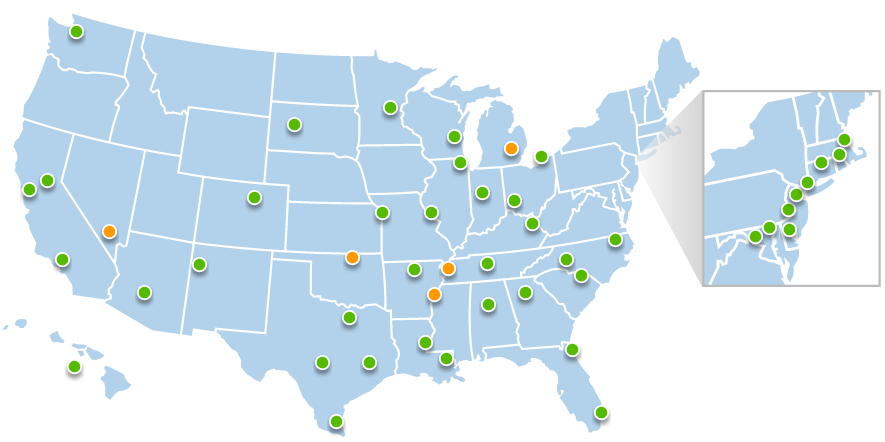
Crystal, tell us a bit about Teach For America and Going Google
Currently, we have over 2000 full-time staff members at Teach For America who are working to ensure that all children, regardless of their backgrounds, have excellent educational opportunities. Our staff members are located across the country, and because teammates are not always co-located, our IT team aims to ensure that all our staff members have the tools they need to do their jobs well and to do their work efficiently. Google Apps has allowed our staff members to easily collaborate and share information with each other and with the corps members we support , in turn allowing us to multiply our impact.
Locations of Teach For America across the country
How is Teach For America using Google Sites?
Google Sites has become a staple within Teach For America’s work environment. Teams use them in a number of ways: as a one-stop shop for all their team-specific information and data, as a way to communicate updates and timelines to internal and external partners. Some teams use them to store notes and ensure that there is a place where institutional knowledge is permanently located. We recently worked with Kyle Horst at Kirksville Web Design to create a Google Site that houses our most up-to-date staff resources and information.
How has your Google Sites intranet helped your organization? What has been the impact of the TFAHub? What feedback have you received?
Our Google Sites intranet houses our most updated resources that are relevant to almost all staff members, such as benefits information or professional development materials. This type of information used to be housed on our internal file server, which requires you to either be in an office to access, or connected to VPN.
With our new Google Sites intranet, we are now able to allow staff members to access information wherever and whenever they are online. Additionally, where our file server lacked context around resources and were not very well maintained, our Google Site allows staff members to easily navigate and search for the specific resources they are looking for. We’ve seen a steady increase in site visits since we launched in February , and have heard from many staff members that it’s been an extremely useful shift in terms of how we present and share all-staff resources.
Our Google Site allows staff members to easily navigate and search for the specific resources they are looking for.
Would you recommend other organizations consider leveraging Google Sites? Why?
I would definitely recommend using Google Sites. It is a great, free platform that allows you to be flexible with how you want to present your information.
Kirksville Web Design would like to thank Pancake City and Chuck Lewellen for their promotion of their website and patronage. We appreciate the opportunity to serve a Kirksville institution. Please give Pancake City a visit at www.pancakecitykirksville.com. We look forward to many years of collaboration.
Like Pancake City, give Kirksville Web Design a try, we all always improving our methods and our marketing. Receive a free draft for your website. Become a patron to a local creative business. Thanks for reading.
Steve Salt of the Near & Far Downtown Grocery Store has discussed with us the possibility of a website and we have begun building for him, from scratch, something impressive. Although not apt to release the website here and today, it is something we are excited to announce. At Kirksville Web Design, we've been dabbling to creating animations that make our sites stand out and seem less static. We're proud to develop and change to fit what our customers need in web design. We guarantee a fun website. Keep posted.
Kirksville Web Design is happy to be taking on new clients as soon as possible. We would like to see 'every business with a website' but we understand the economy may be dragging along. However, advertising is still an essential investment of any business. Make wise use our your marketing dollars, especially this shopping season.
Newspapers, magazines, print, it is all going out of style. Circulate your message, your product, online. So whether you're a business owner in St. Louis, a non-profit in Columbia, a new restaurant in Kansas City, explore advertising 2.0. Give us a call or e-mail We're flexible, affordable, negotiable.
We have recently finished a new website for a financial consultant out of St. Louis. Michael Martin contacted me with a summary of his new business and a drive to market himself online. Treading on some new ground, Mike wanted to sell a credit manual. We used Google Checkout to create a easy way to buy. It is a great opportunity to work with a business of out St. Louis and to help another small business get on the radar.
Any other law firms, financial consultants, professional in need of a custom website? Taking on clients since this project is all wrapped up. Visit www.martinconsultant.com
Thank you for your business to Kirksville Web Design!
Just a quick update for you all. Google Sites' file cabinet now has the new option to upload/link to Google Drive in a one-click method. (See Screenshot Below)
Also, instead of the one-by-one uploading of photos and images through Insert > Image, now you can control or shift select multiple images to upload. Definitely a mini-time saver.
If you have created an image that extends beyond the width of your content, on all browsers a scrollbar will now appear.
See below:
Ugly Ugly, Get Rid of It
Now I made all my images width set to 30 pixels minus the Site Width set in Manage Site > Site Layout. Most of my pages are 940 pixels wide, so I had images set to 910 pixels. Through some update to Google Sites this causes a scrollbar to appear.
Solution:
The most efficient solution, rather than change the width of your images in the HTML, is to change your Site Width. Now all my images must be 32 pixels minus the Site Width in order to avoid the scrollbar.
Alternative is the edit HTML, and in the <img src="..."> add width="[## SITE WIDTH - 32 PIXELS]px" Conclusion:
Unannounced updates and unforeseen bugs from the Google Sites team really throw me for a loop. I'll try to keep all up to date with any Google Sites bugs that come our way. Quickly look over your designs today or this week and make sure there are no gaudy scrollbars.
When a field such as Google Sites web design is brand new it is difficult for clients, designers, and other interested parties to approach the cost. After all, Google Sites is free and the hosting is free. So what are you paying for with a Google Sites website? How much is it really worth?
KWD - Kirksville Web Design doesn't charge you nearly the going rate.
Should the cost of a Google Site be as high as a typical website? No, not really. There is a lot less work that must be done to a Google Sites website because it is more efficient for the designer. I can't speak for all Google Sites designers but here are the factors that dictate our cost.
Factors for Cost
Graphic Design Time
Consultation and Training Time
Coding of Gadgets, HTML, and Scripts Time
Domain Name Settings (DNS) Setup Time
Stock Images
Domain Name
So besides a couple stock photos for $30 and a domain for $10 a year, the cost is dictated by TIME. Being a stickler for good design, graphic design time and the consequential revisions is the bulk of my time. I would say 75%.
Finding and coding a new gadget can take me a couple hours (and pulling out my hair) - 20%. Everything else 5%, I would say.
How much is a Google Sites website going to cost me?
If you are paying a designer less than a $300, get references and samples of their work for quality assurance. If you are paying more than say $1,000, I would get quotes from several designers - don't get swindled into thinking Google Sites is equal to building from scratch.
Contract or No-Contract?
There really isn't much maintenance to speak of for a Google Site, and as said before, no hosting fees. Kirksville Web Design doesn't use contracts, though we tried it. I think its much more liberating for clients not to have a web designer on their payroll. However, if your designer is going to stay engaged with your website, that sounds entirely reasonable.
We have an hourly fee that we work under, $50 an hour. And I think we move very efficiently during that.
When you are a web designer it can be hard to break away from your client's websites to give your own Google Sites a graphical update. Kirksville Web Design had not been given a proper revamp in a couple months.
Using GIMP, we created new header and footer images. We simplified the approach on the homepage and made a more dramatic impression. I know my style, skills, and preferences are always changing. So it's not say the old design was bad, but my designer conscience started to bother me and I started not to like it as much as I once did.
One thing I am fond of is the Google logo and script in the top right. The color and familiarity of the logo grab your attention.